


Having an AI-ready website today is a similar advantage to having a mobile-friendly website in the early 2010s. Right now, we are in the transition period where AI agents are focusing on delivering the best user experience on any website. I also remember browsing my favourite website on my Nokia 5530 and Opera mini was trying to do its best to display all websites on the small screen. But soon, mobile-friendly websites pulled ahead due to a combination of user popularity and mobile-friendly design itself becoming a ranking factor.
Now in 2026 it’s clear that AI is here to stay. There are currently two main ways AI interacts with your website. Either an AI assistant like ChatGPT, Claude or Google’s own Gemini fetches information relevant to the user’s search or question. Or an AI agent (Atlas, Comet, Gemini Spark etc.) takes autonomous multi-step actions on user’s behalf, such as booking, shopping or completing other transactions.
The distinction between AI assistants and AI agents is important, because they both operate slightly differently and one or the other may be more relevant depending on your type of website. In both cases they need to understand your website, interpret its content and determine its purpose. They don’t interact with the website the same way human visitors do. So how exactly does AI navigate your web and why are most websites not ready for AI?
How AI tools read your website
AI is able to use three main methods to interpret and navigate a website: screenshots, HTML markup, and the accessibility tree.
| Tool | Type | HTML markup | Accessibility layer | Screenshots |
|---|---|---|---|---|
| ChatGPT (chat interface) | Assistant | ✓ | ✓ (partial*) | ✗ |
| Claude (chat interface) | Assistant | ✓ | ✓ (partial*) | ✗ |
| Gemini (chat interface) | Assistant | ✓** | ✓ (partial*) | ✗ |
| Google AI Overviews | Assistant | ✓** | ✓ (partial*) | ✗ |
| Perplexity (search) | Assistant | ✓ | ✓ (partial*) | ✗ |
| ChatGPT Atlas | Agent | ✓ | ✓ (primary) | ✓ (when needed) |
| Perplexity Comet | Agent | ✓ | ✓ (primary) | ✓ (visual confirmation) |
| Claude for Chrome | Agent | ✓ | ✓ (primary) | ✓ (fallback) |
**Gemini and Google AI Overviews don’t crawl in real-time. They read from Google’s existing index.
1) Screenshots
Taking a screenshot of the website is closely emulating human experience because normally we mostly consume websites by looking at them. We all know that nowadays AI is fairly good at analyzing and understanding images. So it should be easy for AI to simply read websites and interact with online platforms this way, right? Well there are several caveats.
First one is the efficiency and technical limitations. Processing an image is easy for AI but it still requires substantially more computing power than simply fetching text information. On a big scale this inefficiency translates into big financial cost that nobody will want to carry, regardless of progress in the technology, especially when there’s a more cost-effective alternative. Most agents have this option to lean on, but for example Microsoft fully relies on the accessibility tree with their Microsoft Playwright MCP technology.
Second, using screenshots to navigate your website is mostly exclusive to AI agents. An agentic web browser like Atlas or Comet will be able to screenshot and “see” your website as it performs a task. But Claude and ChatGPT cannot take screenshots when a user interacts with the normal chat interface. The same applies while using increasingly popular Claude Code. That means that most AI assistants that people actually use to research on the web on their behalf in 2026 will rely on the following two methods: HTML markup and potentially accessibility tree. In both cases mostly disregarding any visual styling, images or videos.
2) HTML markup
If you are not familiar with HTML, you can get the best idea of what AI sees if you go to your website, right-click and select View Page Source code. You’ll find references to JavaScript and CSS files. Then you’ll find the content of your website wrapped in different HTML tags like <header>, <footer>, <nav>, <div>, <a>, <article>, <img>, <button>, <h1>, <h2> and so on. In modern websites the styling is separate from the HTML content and lives in separate CSS files, which AI assistants do not bother to analyse. They rely on understanding the structure and the context based on the content itself and these semantic HTML tags. These tags give the content importance and context in the same way the visual styling does to humans. Div is simply a box and on its own doesn’t carry any meaning. However, tags like link, article, image, button, or different levels of headings are a clear signal to the agent about what that element is, what purpose it serves and the meaning and importance it carries.
3) Accessibility layer
Using correct and relevant HTML markup has been an important part of SEO for decades now. It’s also crucial for website accessibility. Screen readers leverage this structure and use it for interpreting the online world to people that cannot see it. They parse HTML into an accessibility tree that further strips the references to CSS styling and distils the HTML markup into what’s most important. Then they can, for example, read it out loud and allow users to navigate this structure through voice or keyboard. As the HTML markup has its limitations and cannot cover every use case, types of elements and their states, there has been an additional layer of markup introduced for accessibility, which are the ARIA labels. So, none of this is new. AI simply loves structure and so it conveniently tapped into the existing specifications that have been created to help to interpret websites without being able to see them. OpenAI states directly that ‘making your website more accessible helps ChatGPT Agent in Atlas understand it better‘.
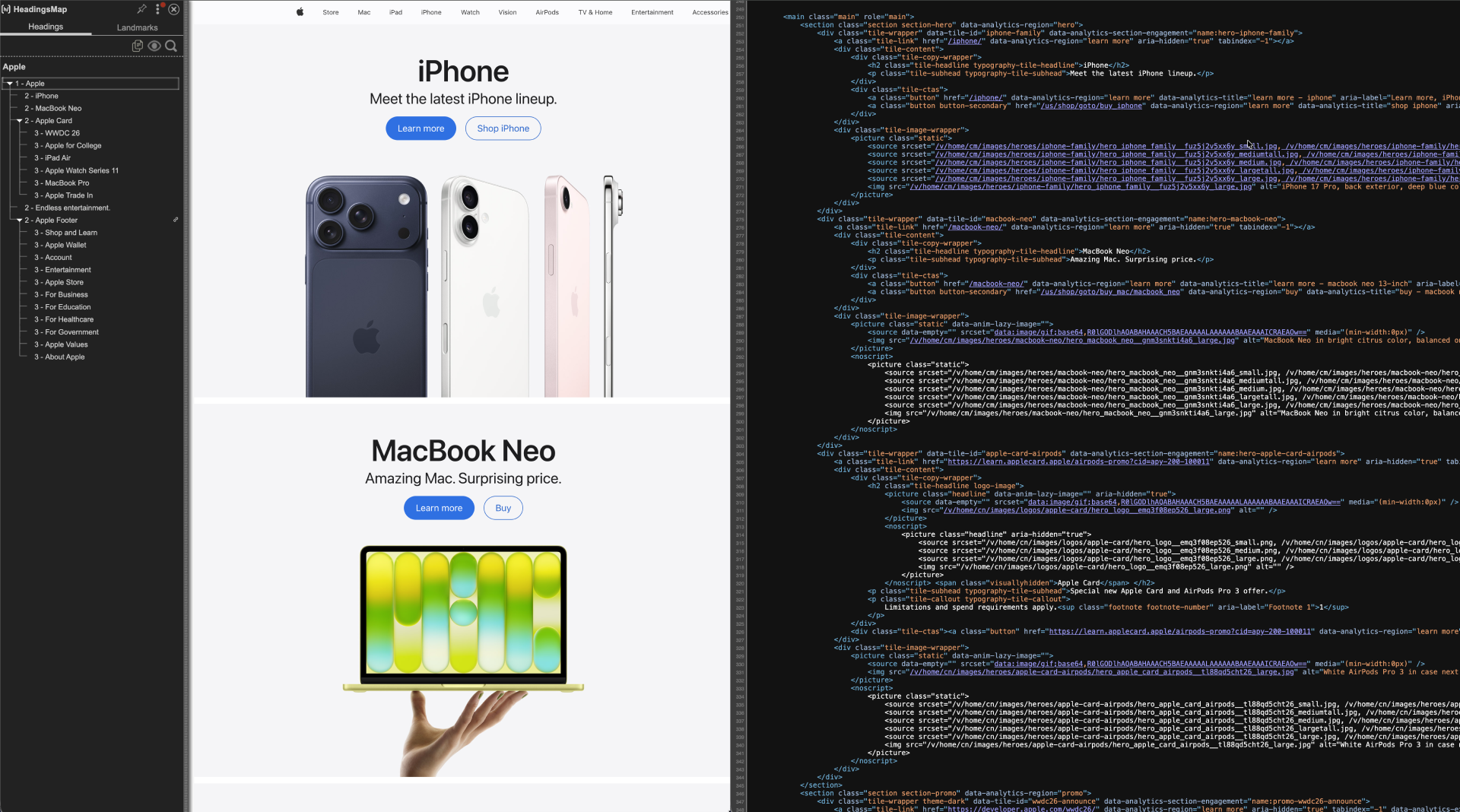
This is an example of accessibility tree structure on the left and markup structure on the right for the Apple.com website.
What “AI-Ready” Means in Practice
AI uses multiple methods to navigate your websites depending on what tools it has available. To help AI navigate your website you want to remove confusing and contradicting signals. Google’s own documentation on building agent-friendly websites recommends a combination of visually clear, semantically correct, and accessible websites. The good news is that all these tactics and practices make the website also better for human visitors, help you fulfil your obligations regarding accessibility and improve your overall SEO across search engines.
Why AI-generated websites aren’t the answer
Logic might suggest that AI will generate websites that will be easy to read and interpret for other AI. The opposite is the reality. We need to keep in mind that over 90% of active websites are not fully following these practices and contain mistakes in their semantic markup according to the WebAIM report. Therefore, AI that has been trained on this data naturally defaults to not using best practices either, especially if it is not specifically prompted to do so, given specific instructions and additional context.
What can you do to make your website AI-ready right now
First it’s important to understand what AI technology your target users are actually using and prioritize accordingly.
For AI agents specifically
- Correct visual hierarchy based on element importance.
- Feedback after each step for forms and user flows.
- Ensure that clickable elements are big enough.
- Layout should be stable and consistent without important and clickable elements shifting.
For AI agents and assistants
- Make sure that especially clickable elements and navigation are labelled correctly in the HTML markup.
- Leverage labels for input fields in your forms.
- Audit your website’s accessibility tree. Make sure that there is the correct hierarchy of H1 to H6 and correct usage of landmarks, semantics (<nav>, <main>, <footer>, <header>).
- Verify your site is server-rendered and does not require execution of JavaScript to display content.
- Make sure important information is displayed on the page immediately without requiring interaction like hovering or clicking.
- Use meaningful link text that describes what the link does instead of a generic “Learn more” or “Click here”.
What’s Coming Next
There’s still noticeable space improvement for more complicated flows such as bookings or reservations, where even with best practices in place, the agent first needs to go through the flow to understand it fully. For these situations Google is proposing the WebMCP standard to allow websites to advertise and explain what actions can be taken by AI agents. It’s not a replacement for all the above, rather an extension that builds on top of these foundations.


